RH2 The Journey RH2 Player Tools
Checklists for attributes, jump timing, codes, and dribble inputs — not a downloadable app.
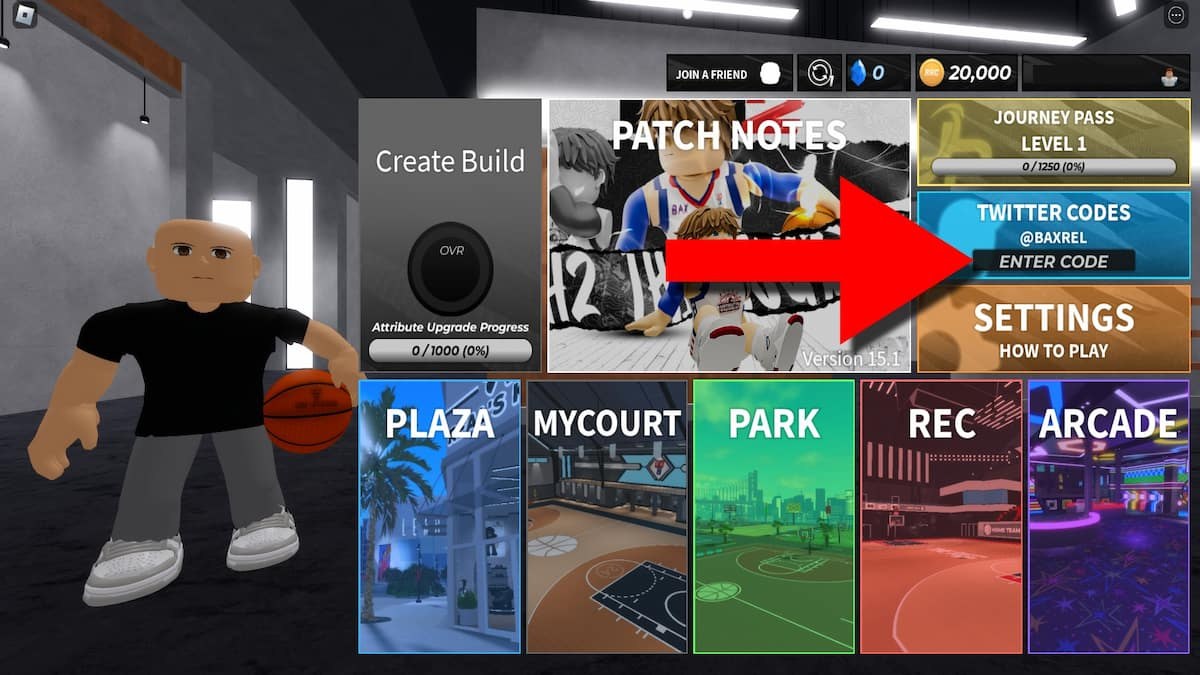
These tools are worksheets you copy, not an installer. RH2 The Journey does not ship a separate planner app. Season 5 still burns Reset Tokens when you rebuild, so the useful work happens on paper (or in a notes file) before you open the creator. Use this hub as a pre-queue ritual: plan the slot, time the jumper, redeem codes, then practice a short dribble bag in Plaza.
The heavy lifting lives on the attribute planner. Everything else on this page is a checklist that points at a real guide. If you are brand new, run the getting started order first, claim active codes, then come back here so you do not spend those tokens on a random Recommended build.
Season 5 launched Friday, August 21, 2026 at 5:00 PM EST and is already playable as online Park, Rec, and Arcade. The experience remains BETA. A worksheet will not survive a PATCH that changes timing, which is why you retest in Plaza after maintenance instead of trusting last week’s green window.
Attribute planner checklists
Open the Season 5 attribute planner and copy the tables for your position. The worksheet walks eight decisions in order: role, vitals (height, weight, wingspan, body type, frame), badge counts, HOF thresholds, Physicals you should not skip, Reset Token cost, then example PG / SG / Center spreads.
Keep one sentence of role text at the top of your note: creator, spacer, lock, finisher, or rebounder. A Point Guard who writes “creator” should not spend like a Center. Compare the finished sheet with the best builds page and the guard or big primers so the numbers match a job teammates can read in Park.
Community Season 5 clips keep citing a lean frame for about +2% green window and Anchor for interior contest with a block-attempt drawback. Treat those as tilts, not free overall. They do not replace Finishing, Shooting, Playmaking, Defense and rebounding, or Physicals.
Jumpshot timing notes (meter on and off)
Write two lines in your notes, not a paragraph:
- Meter on. Use this while you learn. Watch the bar in Plaza until the visual peak matches the button release. If a PATCH hits, repeat ten catch-and-shoot attempts before you queue.
- Meter off. Once the rhythm is in your hands, hide the meter so Park contests do not make you stare at UI. The window does not get larger; you just stop reacting late to a bar.
Season 5 patched a free-throw glitch. Free throws and jumpers are not the same timing. Recheck both. Full form notes, boosts, and takeover shooting sit on the shooting guide. Do not copy a YouTuber’s visual cue if your height and wingspan differ — those change the window more than a new jumper name.
Code redeem checklist
Do this in order every time Rel drops a string:
- Join the BAX Studio group on Roblox.
- Favorite RH2 The Journey on the game page.
- Relog so the main-menu box unlocks.
- Paste the exact string (Season 5 examples:
welcometoseason5_RHC,welcometoseason5_RT,thankyoufors5_RHC,thankyoufors5_RT). - Confirm RHC or Reset Tokens actually landed before you close the menu.
The codes hub lists what is live. The redeem guide covers a missing box. The expired list is the do-not-type page. Waiting-room rewards from the Season 5 launch are separate from these strings; they do not unlock the box by themselves.
Dribble input cheat-sheet
Practice five inputs in MyCourt or Plaza before you chain a ten-move bag. Exact keys depend on device, so keep the controls guide open while you drill. The dribbling guide is the full combo page; this cheat-sheet is only the order of operations.
- Crossover. Opposite of the ball hand (keyboard or D-pad / stick).
- Behind the back. Same-side then down, or the stick quarter-circle your device uses.
- Between the legs. Down plus the opposite direction.
- Step back. Down / back. Use it to create the catch-and-shoot window, not as a panic button.
- Cancel into a shot or pass. A bag that cannot stop is a turnover in Rec.
The video on this page is a keyboard and controller walkthrough. Mobile players still need the on-screen layout from the controls page. Do not spend Playmaking on ankle-breaker theater if your role is spacer — that is an attribute-planner problem, not a combo problem.
Official Discord, group, and after-patch loop
Bookmark three official doors on the links hub: the Roblox game page, the BAX Studio group, @BaxRel, and the Discord invite discord.gg/rh2. Codes, Takeover Weekend hours, and “servers are up” messages appear there before they appear here.
After a PATCH or DOWN FOR MAINTENANCE title:
- Leave the match if you can.
- Recheck jump timing (meter on for ten shots).
- Recheck two dribble inputs that felt late.
- Only then queue Park and Rec.
Print or screenshot the planner, the timing notes, and the dribble cheat-sheet before you queue. None of these pages are an .exe. They exist so Reset Tokens stay in your inventory until the build is actually finished.
Frequently Asked Questions
Quick answers for codes, builds, shooting, and Park play.
Is there an RH2 attribute planner app to download?
No. These tools are in-wiki checklists. Copy the tables on the attribute planner page before you spend Reset Tokens.
What should I write down before I open the creator?
Role, height, weight, wingspan, frame, and the HOF badges you must hit. The Season 5 notes explain why those levers changed.
Should I shoot with the meter on or off?
Meter on in Plaza while you learn, meter off once the release is in your hands. Details are on the shooting guide.
How do I redeem Season 5 codes from this checklist?
Join the BAX Studio group, favorite the game, relog, then paste strings from the codes list. Use how to redeem if the box is missing.
Where do I look up dribble inputs for my device?
Start with the cheat-sheet above, then open controls and the full dribbling guide for combos.
Where is the official RH2 Discord?
The invite is [discord.gg/rh2](https://discord.gg/rh2). Also follow [@BaxRel](https://x.com/BaxRel) and keep the links hub saved.